ディレクトリの概要
/srv はサービスが利用するデータを配置するためのディレクトリ。主にWebサーバやFTPサーバなど、「外部に提供するデータ」を置く場所。
- サーバサービスが提供するデータの保存
- Webサイトのコンテンツや公開ファイルの配置
- サービスごとにデータを整理するための領域
サーバを立てたときに公開ファイルを配置し、設定によって参照される。
※サーバを立てるとは「リクエストを受けて、レスポンスを返す仕組みをつくる」こと
※実際のディストリビューションではvar/wwwが使われることも多い(デフォはvar/wwwだった)
Linuxの仕組みとの関係
/srv は「サービス提供」という役割に直結している。
プログラムの設定/実行/提供データの分離の一部を担うディレクトリ。
/etc設定(どう動くか)/usrプログラム本体/srv実際に提供するデータ
よくある中身
/srv/wwwWebサイトのHTMLや画像などの公開コンテンツを配置/srv/httpApacheなどのWebサーバで使われることがあるディレクトリ/srv/ftpFTPサーバで公開するファイルを置く/srv/dataサービス用のデータ保存領域(アプリ専用データなど)/srv/app特定アプリケーションの公開データをまとめる場所
検証
/srv を使ってWeb公開できるか検証してみる。
※/srvに配置しただけでは公開されず、Apacheの DocumentRoot と Directory設定によって初めて外部からアクセス可能になる
手順
①ディレクトリとファイルを作成
%sudo mkdir -p /srv/www
%echo "hello" | sudo tee /srv/www/index.html
hello
%ls /srv/www
index.html
※teeコマンドはコマンドの実行結果を画面(標準出力)に表示しつつ、同時にファイルへ保存(書き出し)するコマンド。
②Apacheをインストール&起動
%sudo apt install apache2
%sudo systemctl start apache2
%sudo systemctl status apache2
● apache2.service - The Apache HTTP Server
     Loaded: loaded (/usr/lib/systemd/system/apache2.service; enabled; preset: enabled)
     Active: active (running) since Wed 2026-03-25 16:27:41 JST; 2min 45s ago
       Docs: https://httpd.apache.org/docs/2.4/
   Main PID: 115593 (apache2)
      Tasks: 55 (limit: 18148)
     Memory: 5.4M (peak: 6.7M)
        CPU: 39ms
     CGroup: /system.slice/apache2.service
             ├─115593 /usr/sbin/apache2 -k start
             ├─115595 /usr/sbin/apache2 -k start
             └─115596 /usr/sbin/apache2 -k start

Mar 25 16:27:41 shirin-dev systemd[1]: Starting apache2.service - The Apache HTTP Server...
Mar 25 16:27:41 shirin-dev apachectl[115592]: AH00558: apache2: Could not reliably determine the server's fully qualified domain name, using 127.0.1.1. Set the 'ServerName' directive globally to suppress this message
Mar 25 16:27:41 shirin-dev systemd[1]: Started apache2.service - The Apache HTTP Server.
③DocumentRoot変更
%grep -n "DocumentRoot" /etc/apache2/sites-available/000-default.conf
12: DocumentRoot /var/www/htmlDocumentRootのデフォルトは/var/www/html だったので、 /srv/www に変更
%sudo sed -i 's|DocumentRoot /var/www/html|DocumentRoot /srv/www|g' /etc/apache2/sites-available/000-default.conf /etc/apache2/sites-available/default-ssl.conf
%grep -n "DocumentRoot" /etc/apache2/sites-available/000-default.conf
12:	DocumentRoot /srv/www
④ディレクトリの公開許可
%sudo nano /etc/apache2/sites-available/000-default.conf
(下記の内容を追記)
<Directory /srv/www>
    Options Indexes FollowSymLinks
    AllowOverride None
    Require all granted
</Directory>
⑤設定反映
%sudo apache2ctl configtest
AH00558: apache2: Could not reliably determine the server's fully qualified domain name, using 127.0.1.1. Set the 'ServerName' directive globally to suppress this message
Syntax OK
%sudo systemctl restart apache2
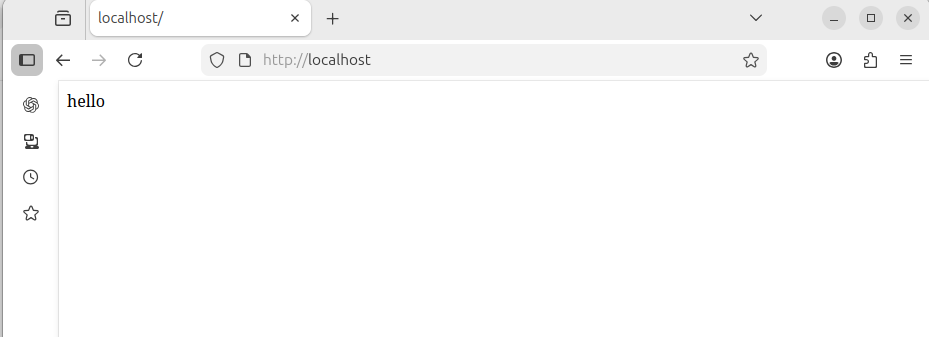
⑥ブラウザで確認